Manage Login Platforms
Updated October 23, 2026
Connect Google, Apple, Twitch, or YouTube so you can sign in to Fourthwall with an account you already have.
Login platforms let you sign in to your Fourthwall account with Google, Apple, Twitch, or YouTube instead of your email and password. You can connect more than one, then use any of them on the login screen.
Where to manage login platforms
Go to Account > Security in your dashboard and find the Login platforms section.
Each connected platform shows the account email you linked. Platforms you haven't connected show a Connect button.
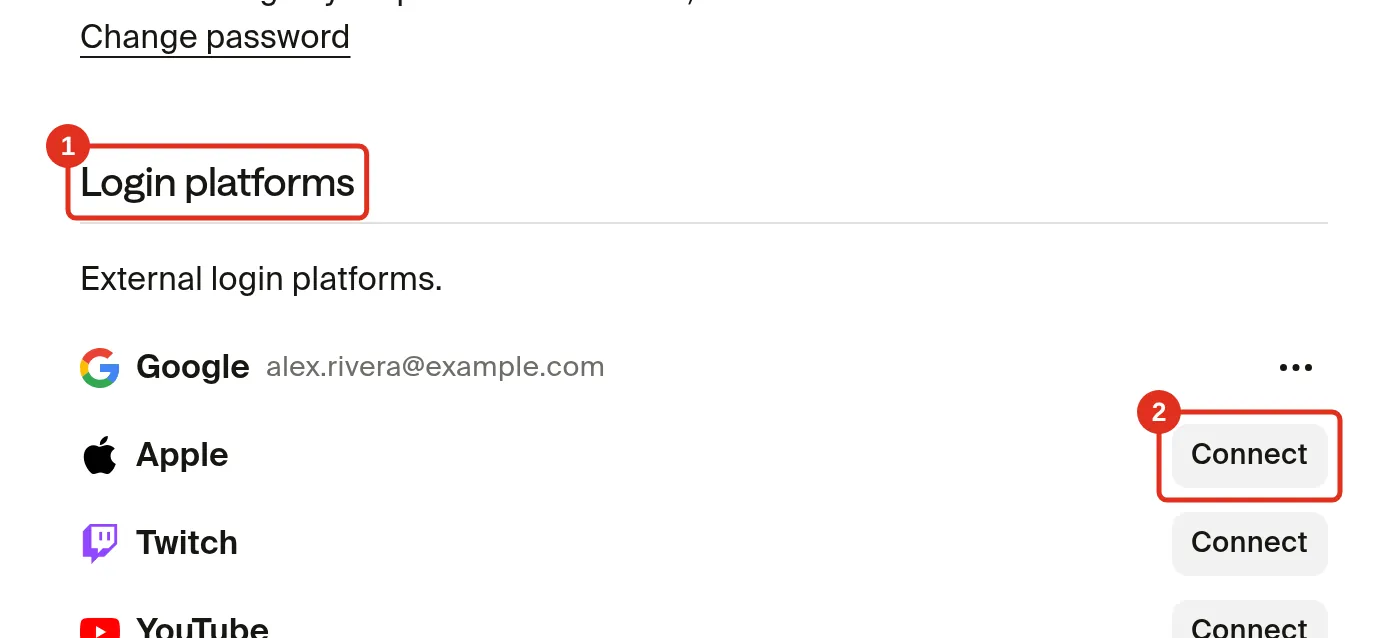
Connect a login platform
You can connect any of these platforms as a sign-in option:
- Apple
- Twitch
- YouTube
- In the Login platforms section, click Connect next to the platform you want.
- Sign in to that platform when prompted. This links it to your Fourthwall account.
Once connected, you can sign in with it. On the login screen, Sign in with Google and Sign in with Apple show first. Click Show more methods to see Sign in with YouTube and Sign in with Twitch.
Signing in with a login platform doesn't skip the verification code Fourthwall sends when you sign in from a new device. See Sign in from a new device.
Disconnect a login platform
To remove a platform you no longer want to use for signing in:
- In the Login platforms section, click the three-dot menu next to the connected platform.
- Click Disconnect.
- In the confirmation, click Disconnect again. Click Cancel to keep it connected.
- If Fourthwall asks you to sign in again to confirm it's you, do so to finish.

You can't disconnect your last sign-in method. If a platform is the only way you can get into your account, connect another platform first, then disconnect the one you want to remove.
Frequently asked questions
Which platforms can I use to sign in?
Google, Apple, Twitch, and YouTube. You can also sign in with your email and password. If you linked X or Facebook in the past, it may still show in the Login platforms section. You can disconnect it, but you can't connect X or Facebook as a new login platform.
Can I reconnect a platform after disconnecting it?
Yes. Go back to Account > Security and click Connect next to that platform to link it again.
Why can't I disconnect a platform?
You can't disconnect your only sign-in method. Connect another platform first, then disconnect it.
Does disconnecting a platform delete my Fourthwall account?
No. Disconnecting only removes that sign-in option. Your account, shop, and data stay exactly as they are.
If you have any questions, do not hesitate to contact us at support@fourthwall.com.