Common payout issues and FAQs
Updated August 3, 2026
This article covers the most common payout questions and how to troubleshoot issues.
If you're looking to set up payouts for the first time, follow this guide: How Do I Get Paid?
How long do payouts take to reach my bank account?
Payout timing depends on your bank, bank country, and the payout method.
Here's a general guide:
- US banks or debit cards: Usually arrive within 1 to 3 business days
- International banks: Can take 3 to 10 business days
Once the payout leaves Stripe, its arrival time is controlled by your bank, so delays are typically bank-side.
My payout is showing as "Failed."
If your payout status is marked as Failed, follow these steps:
Step 1: Log in to Stripe Connect and check that your bank account details are correct. Stripe usually flags problems in both your dashboard and via email.
You can access your Stripe Connect in two ways:
- From your Fourthwall dashboard, by going to Settings > Billing and payouts and clicking Set up new payout bank account or Edit bank connection.
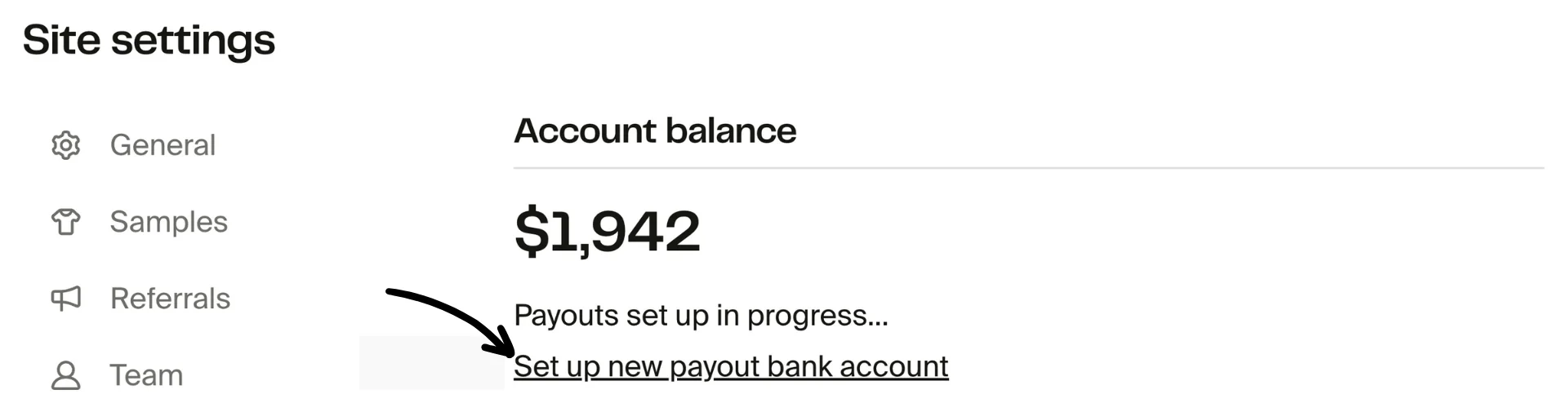
- By going directly to Stripe Connect's express login page
Step 2: Update your bank details on Stripe Connect or correct any issues flagged by Stripe Connect.
Step 3: Contact us at support@fourthwall.com to re-trigger the payout. This does not happen automatically. Before retriggering, support will ask you to confirm that your bank details look correct in your dashboard under Settings > Billing and payouts > Edit bank account, so be ready to verify this.
I updated my bank account, but the payout still wasn't sent.
If a payout failed, it won't re-send automatically. After updating your bank details in Stripe Connect, email us at support@fourthwall.com. Support will ask you to confirm that your bank details look correct in your dashboard under Settings > Billing and payouts > Edit bank account before retriggering the payout, so be ready to verify this.
My payout has been showing "Processing" for a long time.
Some payouts may take longer than usual, depending on the bank. If your payout has been processing for several days, please reach out, and we'll investigate and make sure everything is on track.
I had a shop balance over $25, but didn't receive a payout or see any indication that a payout was initiated this month.
This means the payout was not triggered and requires manual review. Before contacting support, confirm the following:
- Your payout details are fully set up and verified in Stripe Connect
- There are no pending actions or setup errors flagged in Stripe
- Your balance clears the minimum that applies to you. If you receive payouts through bill.com in Brazilian real (BRL), the minimum is $35 rather than $25, so a balance between the two carries over to the next month. See Minimum payout threshold for details.
If everything appears correct and there is still no payout activity shown on your dashboard, please contact us at support@fourthwall.com. We'll review your account and help resolve the payout issue.
My payout shows as "Paid," but I don't see it in my bank.
When a payout shows as Paid, it means your bank has confirmed receipt. However, some banks, especially international ones, take 1 to 2 extra business days to show the funds in your statement.
- If it's been longer than 2 business days, email us, and we'll send you a trace ID to help your bank locate the funds.
- Rarely, a bank may initially accept the payout and then return it if there's a mismatch in account information (such as a wrong name or an invalid account). In that case:
- The payout status will change to Failed
- The funds will return to your Stripe Connect balance within a few days
- Follow the steps for failed payouts above to resolve
I selected the wrong country during payout setup, and now I can't add my bank details.
No problem! We'll need to archive your current Stripe Connect account so you can restart the setup with the correct country selected. Send us an email at support@fourthwall.com, and we'll take care of it.
To help us verify shop ownership before archiving the account, include your shop URL (for example, yourshop.fourthwall.com) in the email, or send it from the email address associated with your shop.
If your country appears on the Countries NOT supported by Fourthwall list (such as Palestine State, Iran, Syria, and others), no payout method is available, including Stripe and bill.com. See What if your country is not supported by Stripe for the full list and details.
My payout total doesn't match my transactions
This is usually due to timezone differences in your report.
- Payouts are based on the prior month's transactions in UTC.
- If your dashboard is set to a different timezone, the transactions may appear to fall into the wrong month.
To reconcile properly:
- Go to Settings > General
- Change your dashboard time zone to UTC
- Download your CSV report again
Learn more here: How to Set the Timezone for Your Fourthwall Dashboard
I switched from Individual to Business. Do I need to update my payout info?
Yes. We'll need to archive your existing Stripe Connect account so you can reset it using your business details. Send us an email at support@fourthwall.com, and we'll archive your Stripe Connect account.
To help us verify shop ownership before archiving the account, include your shop URL (for example, yourshop.fourthwall.com) in the email, or send it from the email address associated with your shop.
I see a transaction labeled "Payout" in my billing history
Manual payouts issued by Fourthwall (for example, when support re-triggers a failed payout) appear as Payout in Settings > Billing and payouts > Transactions. These are separate from your regular monthly Stripe payouts and show the date and amount of the manual transfer.