Transaction fees
Updated May 14, 2026
Note: Fourthwall has no monthly fees or fixed costs for creators. Physical products are completely free, you only pay payment processing fees on each order. Digital products have a 5% platform fee on the Free plan (0% on Fourthwall Pro).
How do transaction fees work?
Fourthwall uses Stripe for processing credit cards, Apple Pay, and Google Pay transactions, along with local payment methods. Our payment provider partner charges a 2.9% + $0.30 credit card processing fee on all domestic credit card transactions. The processing fee for international credit card transactions is 3.9% + $0.30. This is the same processing fee that Shopify, Patreon, and Squarespace charge as well for credit card payments.
Payment processing fees
PayPal transactions
We go directly to PayPal, and they charge 3.49% + $0.49 processing fee for domestic PayPal transactions. For international PayPal transactions, the processing fee is 4.99% + $0.49 per transaction. These are the same prices you'll find on their website.
Buy Now, Pay Later (BNPL) transactions
The BNPL providers (AfterPay/Klarna) charge higher transaction fees than other payment options like credit cards or PayPal. With BNPL, the payment transaction fee is 6% + $0.30 per transaction (and an additional 1% for international customers). By default, BNPL as a checkout option is disabled on your shop. You can learn more here.
How are transaction fees calculated?
Transaction fees are calculated based on the total amount paid for the order and have two components: a flat $0.30 fee and a variable percentage fee of 2.9%. The flat amount is charged for each transaction regardless of the transaction amount. The variable percentage fee is based on the total amount processed by the payment provider (credit cards or PayPal).
Example:
On an order that includes a t-shirt for $25.00, shipping of $6.00, and sales tax of $2.50, the total for that order is $33.50. This is the amount the customer will pay with their credit card. For this order, the transaction fee is $1.27 ($0.30 + $2.9% x $33.50).
Now, if the same order of $33.50 has a discount code for $5.00, the total for the order changes to $28.50, and so does the transaction fee to $1.13 ($0.30 + 2.9% x $28.50). The transaction fee is only charged based on the amount processed by payment providers (credit cards or PayPal).
Digital product platform fee
Fourthwall charges a 5% platform fee on digital product sales for creators on the Free plan. On Fourthwall Pro, the platform fee on digital products is 0%. Physical products never have a platform fee, regardless of plan.
The platform fee is calculated on the original list price of the digital product, not the discounted amount a customer pays at checkout. Promo codes, sales, and other discounts reduce what the customer pays, but they do not reduce the platform fee.
This is different from payment processor fees, which are calculated on the amount the customer actually pays:
- Payment processor fees (Stripe, PayPal, BNPL) are calculated on the amount paid at checkout.
- Platform fee on digital products is calculated on the original list price, before any discounts.
Note: The platform fee rate is set at the time of each transaction. If you later upgrade to Fourthwall Pro or downgrade to the Free plan, the rate is not applied retroactively to past orders.
Example:
A customer buys a $10 ebook with a 20% off promo code. The customer pays $8 at checkout.
- Platform fee (Free plan): $0.50, which is 5% of the $10 list price.
- Stripe processing fee: $0.53, which is 2.9% of $8 + $0.30.
- Platform fee on Fourthwall Pro: $0, since Pro removes the digital product platform fee.
The platform fee stays at $0.50 even though the customer paid $8, because it is based on the list price.
How do I check the estimated fees for my product?
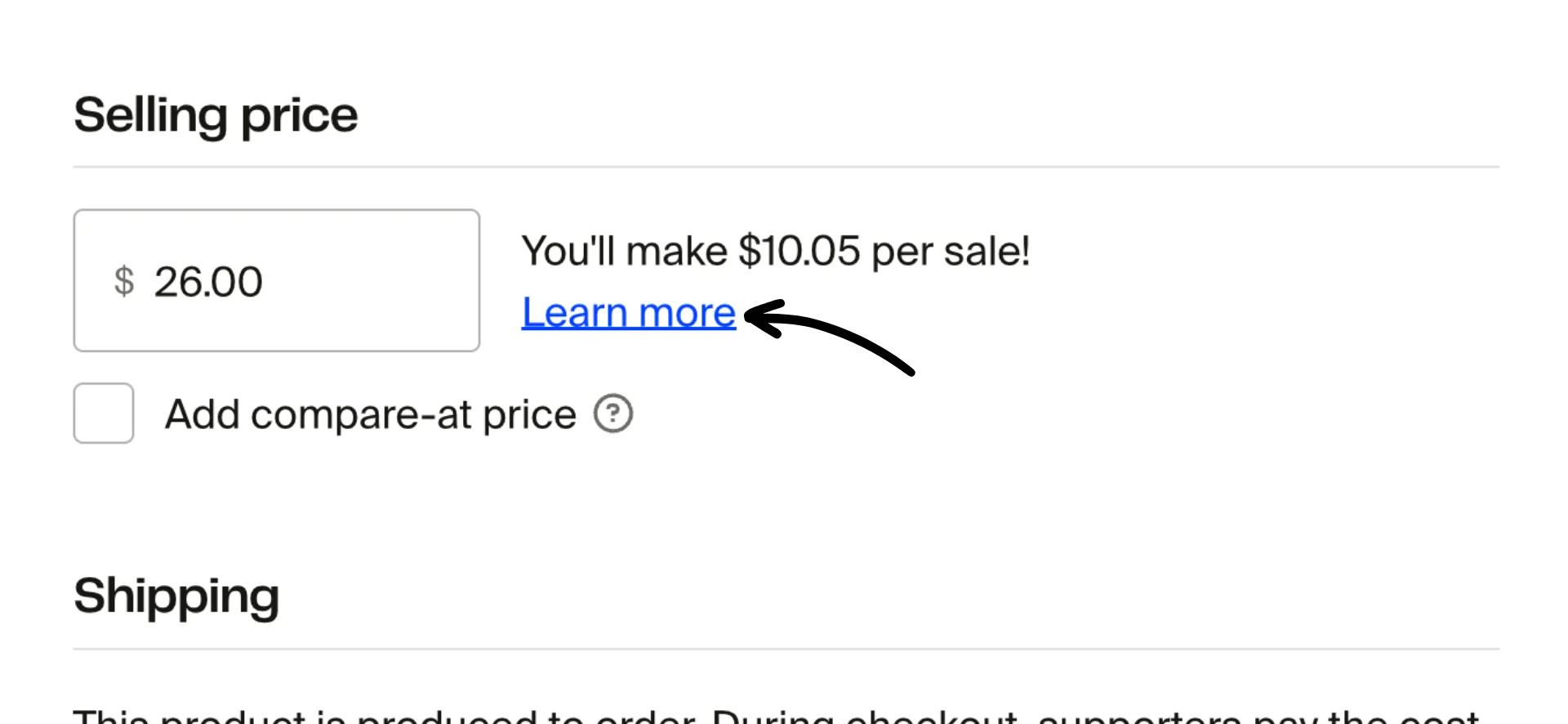
To get this information, go to one of your products. Scroll to "Selling price" and click on Learn more.
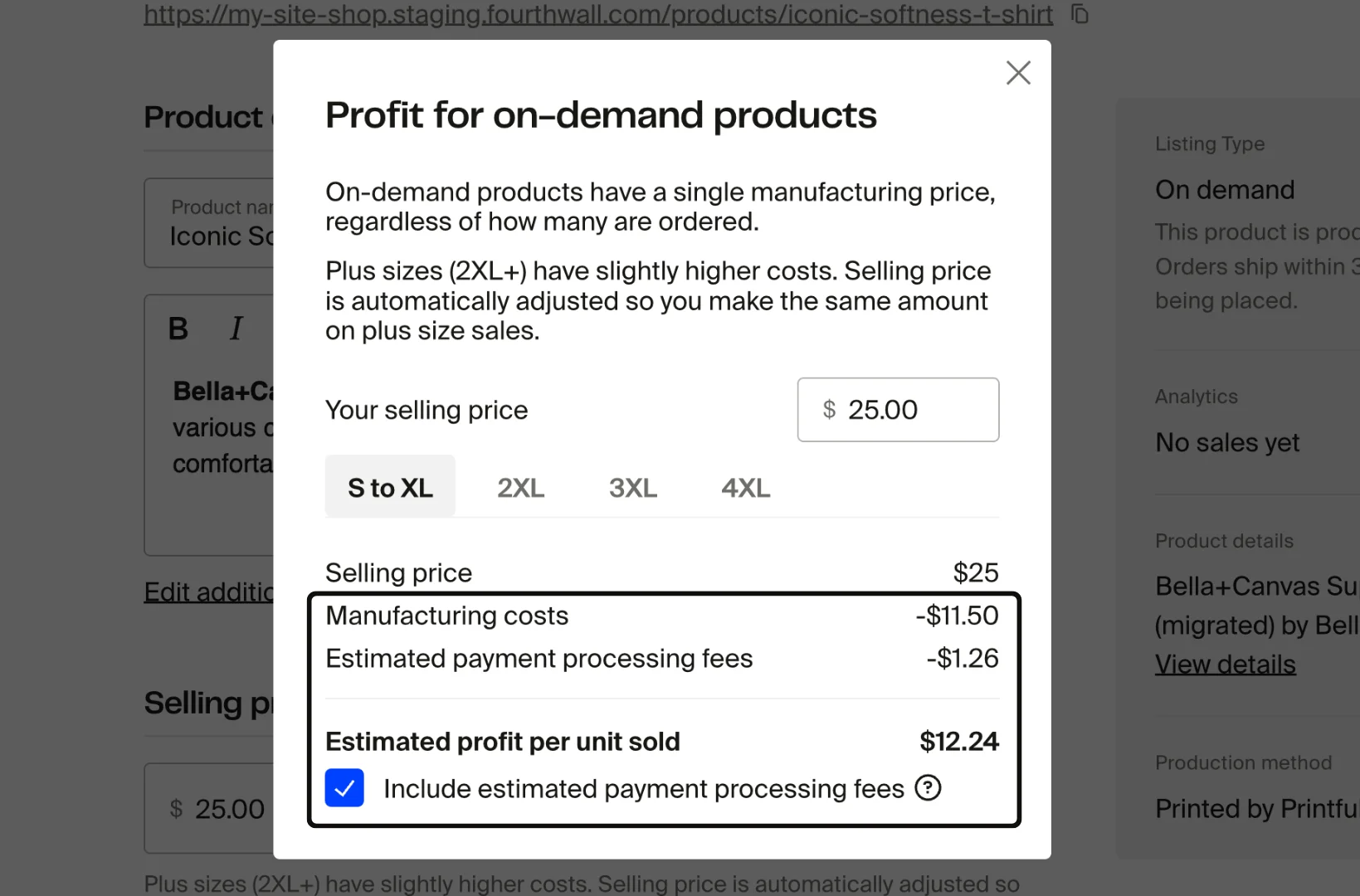
In the pop-up window, you'll see "Manufacturing costs" (a.k.a. production costs), which typically refers to the total expense charged to create and prepare a unit.
Tip: Check the box for "Include estimated payment processing fees" to see the estimated processing fee per transaction. This provides a realistic view of your final profit and helps you understand why your payout might be lower than expected.
If you have any questions, feel free to contact us.