Order samples
Updated September 17, 2026
Find out how to request product samples, evaluate quality, and address any issues before selling to fans
Ordering a sample lets you experience the product firsthand before selling it to your customers. With hundreds of options available across different fits and fabrics, samples give you the chance to check the material, comfort, and overall quality. This helps you confirm that the product you've chosen meets your standards and is something your community will be excited to wear.
Sample pricing
Samples are priced at cost, meaning you pay only the manufacturing price with no markup. All sample orders are priced and charged in USD (the platform's base manufacturing currency), regardless of your shop's base currency setting. If your payment method is in a different currency, your card issuer handles the conversion automatically.
If you're on Fourthwall Pro, you receive $10 in shop credit each month that rolls over and never expires. You can combine shop credit with a credit card to cover any remaining balance.
Referral credits also apply to sample orders. When you refer a new creator to Fourthwall through the Affiliate+ program, you earn credits that can go toward your next sample order.
Step 1: Start a sample order
You can begin a sample order from several places in your dashboard:
- Cart icon in the top bar: Click the cart icon at the top of your dashboard. When you have items in your cart, a badge shows the item count. From the cart, click Choose products to order to go straight to the product selection page.
- Orders page: Go to Orders and click Place order in the page header.
- + Create menu: Click + Create > Place an order from anywhere in your dashboard.
On iOS and Android, tap the cart icon in the Home header to open your samples cart. The icon shows a live badge with the current item count.

On the samples order page, you'll see your available shop credit balance displayed at the top (for example, "You have $X in shop credit"). Click Choose products to order to start adding items.

Note: You can place your sample order using your credit card, shop credit, or a mix of both.
Step 2: Add items to your cart
Your most recently created products appear at the top. You'll see each item's at-cost price (the manufacturing cost with no markup) and current stock availability.
- Use the + and - buttons to select the quantity for your order.
- Click Add products to cart to include them in your basket for checkout.

Tips:
- Instantly available products appear automatically.
- Requested products appear once the product listers have finished adding them to your shop.
- For items with a minimum order quantity, reach out to us at support@fourthwall.com to request samples.
Step 3: Review your cart
Access your cart at any time by clicking the cart icon in the dashboard top bar. The badge on the icon shows how many items are in your cart.

From here, you can:
- Add more or remove products
- See the total amount to pay (if you have enough credits to cover the items, you'll see $0)
- View your cart
- Proceed to checkout
Step 4: Complete your order
When you're ready to complete your order, click Order now. If you have shop credit, it's applied automatically to your total.

- Enter your shipping, delivery, and payment information, and click Complete order.
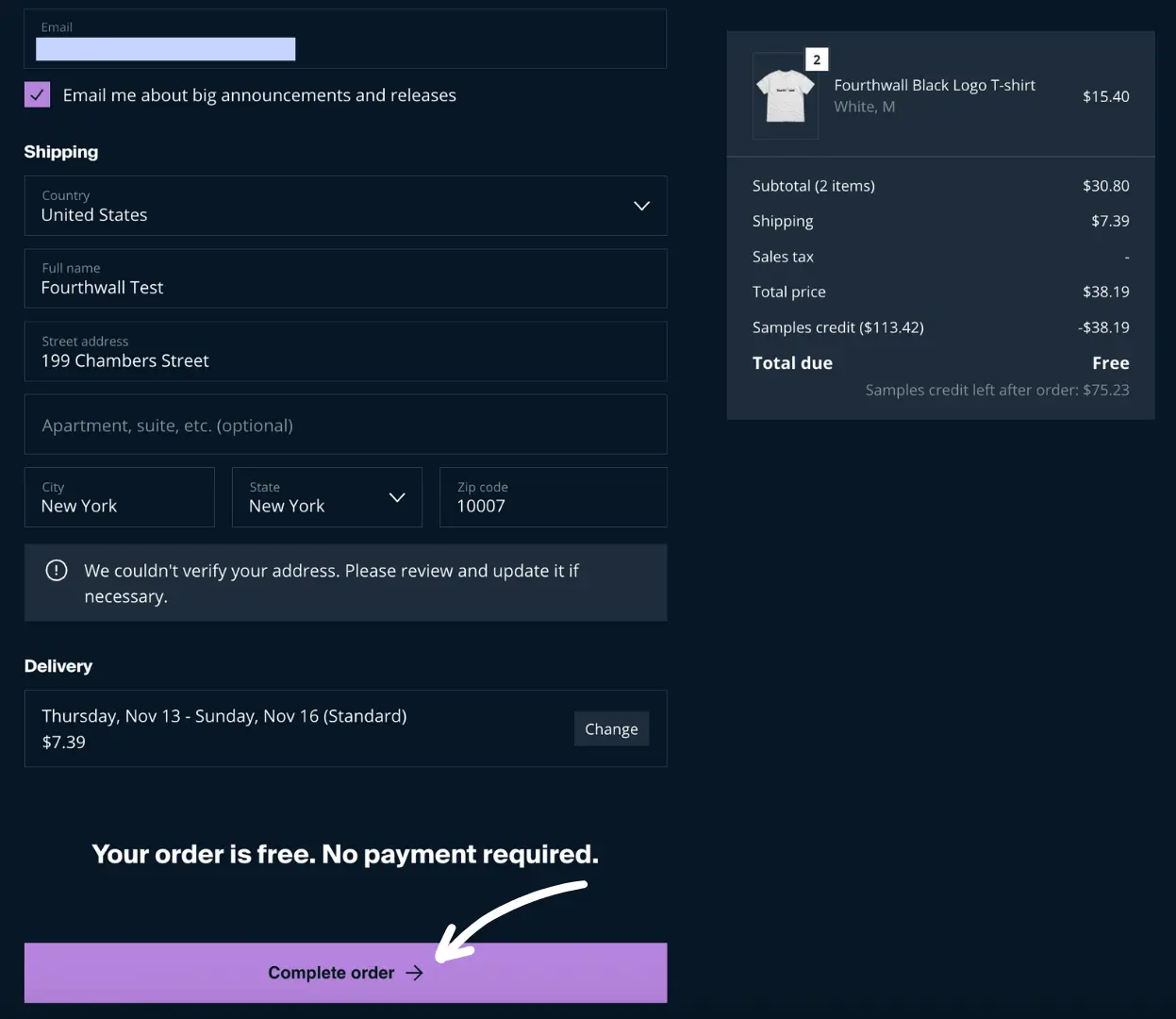
You'll see a confirmation screen and receive an email with your order details and tracking info once your samples ship.
Note: Credit card processing fees apply if any part of the order isn't covered by shop credit. Orders paid entirely with shop credit won't incur fees.
Ordering samples on mobile
The Fourthwall mobile app on iOS and Android has a dedicated samples cart so you can review and check out from your phone. You can reach the samples cart from several entry points:
- Home header cart icon. Tap the cart icon at the top of the Home screen to jump straight to your samples cart.
- Home recommendations. Add products to your cart directly from the recommended samples on the Home screen.
- Order list. Open the samples cart from the order list without leaving the screen you use to track orders.
- Push notifications. Tap a samples-related push notification to deep-link into the cart.
- Deep links. Shared links open the samples cart in the app on a supported device.
After you complete checkout on mobile, the samples cart clears and the Orders tab refreshes so your new order appears right away.
Expected turnaround time
Sample orders follow the same production and shipping timeline as regular orders. Most on-demand products take 3 to 7 business days for production, plus shipping time based on your location and selected shipping method. You'll receive tracking information by email once your sample ships.
International shipping and customs for sample orders
Sample orders follow the same Print-on-Demand (POD) fulfillment routing rules as regular orders. The system selects a fulfillment facility at the time of order based on real-time inventory and logistics, so the country your sample ships from is not guaranteed and may differ from what you expect.
The "Ships from" list on a product page shows the regions eligible to fulfill that item. It does not lock the sample to a specific country. Routing is dynamic, so a product listed as shipping from multiple regions may still be fulfilled from any of them based on stock at the moment you order. For more detail on how routing decisions are made, see How fulfillment location works.
If your sample ships across a border, the destination country may charge import duties and customs fees on arrival. These fees are the creator's responsibility on sample orders. Samples are NOT exempt from import duties, even though they are priced at cost and intended for quality checks. Fourthwall displays an automatic duty notice at checkout for cross-border carts. See Shipping and delivery expectations for the exact wording and how Delivered Duty Paid (DDP) routes differ.
Brazil routing example
If a product lists Brazil in its "Ships from" regions, the sample may ship domestically within Brazil, which avoids cross-border duties on that order. Domestic routing is not guaranteed, since fulfillment depends on real-time inventory at the time you place the sample. If stock is unavailable at the Brazilian facility, the sample may be routed from another country and import duties will apply on arrival.
What to check when your sample arrives
When your sample arrives, inspect it carefully before launching the product to your customers:
- Print quality: Check that the design is sharp, colors are vibrant, and there's no smudging or misalignment. Compare the print to your original artwork file.
- Color accuracy: Compare the printed colors to your design file on screen. Keep in mind that screen colors can differ from printed output, but the overall palette should look consistent.
- Fit and sizing: Try on the product or measure it against a size chart. Check the fit in the shoulders, chest, and length to make sure it matches your expectations.
- Material and finish: Feel the fabric weight, texture, and stitching quality. Check for any loose threads or manufacturing inconsistencies.
Tip: Order one sample per print method (Direct-to-Garment, Direct-to-Film, embroidery) if you offer products using different techniques. Each method produces a different look and feel.
Samples vs. mockups
Digital mockups show an approximation of how your design will look on a product, but they can't capture everything. Printed colors may appear slightly different from what you see on screen, and fabric texture, weight, and drape can only be evaluated in person. Samples give you the real product experience, so treat the mockup as a starting point and the sample as the final check before launching.
How to check your sample order status
Step 1: Track your sample orders anytime from your dashboard: Orders > All orders.
Step 2: Click the funnel icon > Only sample orders > Done.

This view shows all your active and past sample orders, including their fulfillment and shipping status.
Before you report a sample defect
Important: Quality reports apply to physically delivered samples only. The team can't open a quality report based on what you see in the product designer or a live preview, since the actual print may look different from the on-screen render.
To report a defect on a sample, make sure all three of these are true:
- Order status is Delivered. The sample has reached you and shows as Delivered in Orders.
- You have the order number. Find it on the order detail page or in the shipping confirmation email.
- You have photos of the received item. Capture clear photos of the defect, including the full product and a close-up of the affected area.
If your issue is in the product designer or live-preview stage (for example, a print location not appearing on the mockup), see Troubleshoot design and rendering issues instead.
Having issues with a sample order?
Sample orders start production quickly, allowing you to review actual product quality before a launch.
Once a sample order is placed, design details such as logo size, placement, or artwork cannot be modified. If you're still refining your design, it's best to finalize all elements before placing a sample order to prevent unexpected outcomes.
Why you might not see a Cancel or Edit option
The 'Cancel items' or 'Edit order' option only appears if the order is still eligible for changes. If you don't see it, the order has already progressed and can't be stopped through the dashboard.
Exchange or return requests
Exchanges are typically used for sizing issues, defects, or incorrect items and may require help from support or the creator. Returns are limited and generally available only for defective items. We handle these situations on a case-by-case basis. Please note that issues with samples due to human error or product limitations are not covered.
What to do if you need help
Reach out to support at support@fourthwall.com as soon as possible so the team can review whether any intervention is still possible. Support typically responds within 24 hours on business days.
When you escalate a confirmed print placement defect, support coordinates with the manufacturing partner on an expedited reprint. The reprint follows the same production timeline as your original sample: 3 to 7 business days for production, plus shipping based on your location and selected method.
If you're working against a deadline, state the deadline clearly in your email to support@fourthwall.com and reference the order number so the team can prioritize accordingly.